SignIn with Facebook
Setting up Facebook login on your Flutter app using Parse
Introduction
Parse Server supports 3rd party authentication. In this guide you will learn how to setup Facebook authentication/login on your Flutter app using Parse.
Prerequisites
To complete this tutorial, you will need:
- A Flutter app created and connected to Back4App.
- Note: Follow the Install Parse SDK on Flutter project to create an Flutter Project connected to Back4App.
- [Facebook for Developers Account] (https://developers.facebook.com)
- A device (not Simulator) running Android or iOS.
Goal
To add Facebook login on your Flutter app using Parse Server
1 - Configure Facebook Login for Android - Quickstart
- Follow instructions the plugin flutter_facebook_authfor Android on link https://facebook.meedu.app/#/android
2 - Configure Facebook Login for Android - Quickstart
- Follow instructions the plugin flutter_facebook_authfor iOS on link https://facebook.meedu.app/#/ios
3 - Set up Parse Auth for Facebook
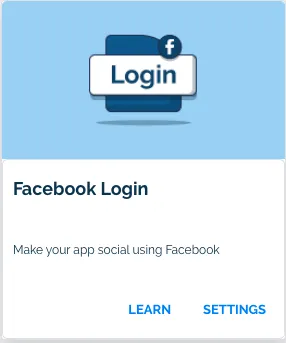
Go to Back4App website, log in and then find your app. After that, click on Server Settings and search for the Facebook Login block and select Settings.
The Facebook Login section looks like this:
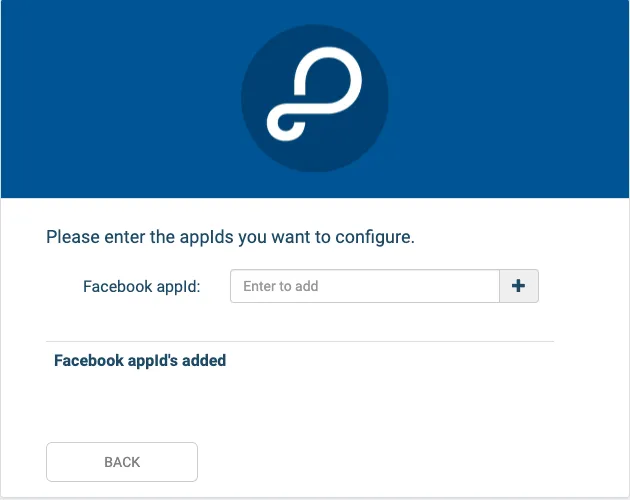
Now, you just need to paste your Facebook appId in the field below and click on the button to save.
In case you face any trouble while integrating Facebook Login, please contact our team via chat!
4 - Add the Sign In with Facebook
Now that you have the project set up, we can get the user data and sign in to Parse.
According to the documentation, we must send a Map with user authentication data.
1         //Make a Login request
2         final LoginResult result = await FacebookAuth.instance.login();
3
4         if (result.status != LoginStatus.success) {
5           Message.showError(context: context, message: result.message!);
6           return;
7         }
8
9         final AccessToken accessToken = result.accessToken!;
10
11        //https://docs.parseplatform.org/parse-server/guide/#facebook-authdata
12        //According to the documentation, we must send a Map with user authentication data.
13
14        //Make sign in with Facebook
15        final parseResponse = await ParseUser.loginWith('facebook',
16            facebook(accessToken.token, accessToken.userId, accessToken.expires));
5 - Sign in with Facebook from Flutter
Let’s now use our example for Sign in with Facebook in Flutter App, with a simple interface.
Open your Flutter project, go to the main.dart file, clean up all the code, and replace it with:
1   import 'package:flutter/foundation.dart' show kIsWeb;
2   import 'package:flutter/material.dart';
3   import 'package:flutter_facebook_auth/flutter_facebook_auth.dart';
4   import 'package:parse_server_sdk_flutter/parse_server_sdk.dart';
5
6   void main() async {
7     WidgetsFlutterBinding.ensureInitialized();
8
9     final keyApplicationId = 'YOUR_APP_ID_HERE';
10    final keyClientKey = 'YOUR_CLIENT_KEY_HERE';
11    final keyParseServerUrl = 'https://parseapi.back4app.com';
12
13    await Parse().initialize(keyApplicationId, keyParseServerUrl,
14        clientKey: keyClientKey, debug: true);
15
16    if (kIsWeb) {
17      // initialiaze the facebook javascript SDK
18      FacebookAuth.i.webInitialize(
19        appId: "YOUR_FACEBOOK_APP_ID", //<-- YOUR APP_ID
20        cookie: true,
21        xfbml: true,
22        version: "v9.0",
23      );
24    }
25
26    runApp(MyApp());
27  }
28
29  class MyApp extends StatelessWidget {
30    Future<bool> hasUserLogged() async {
31      ParseUser? currentUser = await ParseUser.currentUser() as ParseUser?;
32      if (currentUser == null) {
33        return false;
34      }
35      //Checks whether the user's session token is valid
36     final ParseResponse? parseResponse =
37          await ParseUser.getCurrentUserFromServer(currentUser.sessionToken!);
38
39      if (parseResponse?.success == null || !parseResponse!.success) {
40        //Invalid session. Logout
41        await currentUser.logout();
42        return false;
43      } else {
44        return true;
45      }
46    }
47
48    @override
49    Widget build(BuildContext context) {
50      return MaterialApp(
51        title: 'Flutter - Sign In with Facebook',
52        theme: ThemeData(
53          primarySwatch: Colors.blue,
54          visualDensity: VisualDensity.adaptivePlatformDensity,
55        ),
56        home: FutureBuilder<bool>(
57            future: hasUserLogged(),
58            builder: (context, snapshot) {
59              switch (snapshot.connectionState) {
60                case ConnectionState.none:
61                case ConnectionState.waiting:
62                  return Scaffold(
63                    body: Center(
64                      child: Container(
65                          width: 100,
66                          height: 100,
67                          child: CircularProgressIndicator()),
68                    ),
69                  );
70                default:
71                  if (snapshot.hasData && snapshot.data!) {
72                    return UserPage();
73                  } else {
74                    return HomePage();
75                  }
76              }
77            }),
78      );
79    }
80  }
81
82  class HomePage extends StatefulWidget {
83    @override
84    _HomePageState createState() => _HomePageState();
85  }
86
87  class _HomePageState extends State<HomePage> {
88    @override
89    Widget build(BuildContext context) {
90      return Scaffold(
91          appBar: AppBar(
92            title: const Text('Flutter - Sign In with Facebook'),
93          ),
94          body: Center(
95            child: SingleChildScrollView(
96              padding: const EdgeInsets.all(8),
97              child: Column(
98                crossAxisAlignment: CrossAxisAlignment.stretch,
99                children: [
100                 Container(
101                   height: 200,
102                   child: Image.network(
103                       'http://blog.back4app.com/wp-content/uploads/2017/11/logo-b4a-1-768x175-1.png'),
104                 ),
105                 Center(
106                   child: const Text('Flutter on Back4App',
107                       style:
108                           TextStyle(fontSize: 18, fontWeight: FontWeight.bold)),
109                 ),
110                 SizedBox(
111                   height: 100,
112                 ),
113                 Container(
114                   height: 50,
115                   child: ElevatedButton(
116                     child: const Text('Sign In with Facebook'),
117                     onPressed: () => doSignInFacebook(),
118                   ),
119                 ),
120                 SizedBox(
121                   height: 16,
122                 ),
123               ],
124             ),
125           ),
126         ));
127   }
128
129   void doSignInFacebook() async {
130     late ParseResponse parseResponse;
131     try {
132       //Check if the user is logged.
133       final AccessToken? currentAccessToken =
134           await FacebookAuth.instance.accessToken;
135       if (currentAccessToken != null) {
136         //Logout
137         await FacebookAuth.instance.logOut();
138       }
139
140       //Make a Login request
141       final LoginResult result = await FacebookAuth.instance.login();
142
143       if (result.status != LoginStatus.success) {
144         Message.showError(context: context, message: result.message!);
145         return;
146       }
147
148       final AccessToken accessToken = result.accessToken!;
149
150       //https://docs.parseplatform.org/parse-server/guide/#facebook-authdata
151       //According to the documentation, we must send a Map with user authentication data.
152
153       //Make sign in with Facebook
154       parseResponse = await ParseUser.loginWith('facebook',
155           facebook(accessToken.token, accessToken.userId, accessToken.expires));
156
157       if (parseResponse.success) {
158         final ParseUser parseUser = await ParseUser.currentUser() as ParseUser;
159
160         //Get user data from Facebook
161         final userData = await FacebookAuth.instance.getUserData();
162
163         //Additional Information in User
164         if (userData.containsKey('email')) {
165           parseUser.emailAddress = userData['email'];
166         }
167
168         if (userData.containsKey('name')) {
169           parseUser.set<String>('name', userData['name']);
170         }
171         if (userData["picture"]["data"]["url"] != null) {
172           parseUser.set<String>('photoURL', userData["picture"]["data"]["url"]);
173         }
174
175         await FacebookAuth.instance.logOut();
176         parseResponse = await parseUser.save();
177
178         if (parseResponse.success) {
179           Message.showSuccess(
180               context: context,
181               message: 'User was successfully with Sign In Facebook!',
182               onPressed: () async {
183                 Navigator.pushAndRemoveUntil(
184                   context,
185                   MaterialPageRoute(builder: (context) => UserPage()),
186                   (Route<dynamic> route) => false,
187                 );
188               });
189         } else {
190           Message.showError(
191               context: context, message: parseResponse.error!.message);
192         }
193       } else {
194         Message.showError(
195             context: context, message: parseResponse.error!.message);
196       }
197     } on Exception catch (e) {
198       print(e.toString());
199       Message.showError(context: context, message: e.toString());
200     }
201   }
202 }
203
204 class UserPage extends StatelessWidget {
205   Future<ParseUser?> getUser() async {
206     return await ParseUser.currentUser() as ParseUser?;
207   }
208
209   @override
210   Widget build(BuildContext context) {
211     void doUserLogout() async {
212       final currentUser = await ParseUser.currentUser() as ParseUser;
213       var response = await currentUser.logout();
214       if (response.success) {
215         Message.showSuccess(
216             context: context,
217             message: 'User was successfully logout!',
218             onPressed: () {
219               Navigator.pushAndRemoveUntil(
220                 context,
221                 MaterialPageRoute(builder: (context) => HomePage()),
222                 (Route<dynamic> route) => false,
223               );
224             });
225       } else {
226         Message.showError(context: context, message: response.error!.message);
227       }
228     }
229
230     return Scaffold(
231         appBar: AppBar(
232           title: Text('Flutter - Sign In with Facebook'),
233         ),
234         body: FutureBuilder<ParseUser?>(
235             future: getUser(),
236             builder: (context, snapshot) {
237               switch (snapshot.connectionState) {
238                 case ConnectionState.none:
239                 case ConnectionState.waiting:
240                   return Center(
241                     child: Container(
242                         width: 100,
243                         height: 100,
244                         child: CircularProgressIndicator()),
245                   );
246                 default:
247                   return Padding(
248                     padding: const EdgeInsets.all(8.0),
249                     child: Column(
250                       crossAxisAlignment: CrossAxisAlignment.stretch,
251                       mainAxisAlignment: MainAxisAlignment.center,
252                       children: [
253                         Center(
254                             child: Text(
255                                 'Hello, ${snapshot.data!.get<String>('name')}')),
256                         SizedBox(
257                           height: 16,
258                         ),
259                         Container(
260                           height: 50,
261                           child: ElevatedButton(
262                             child: const Text('Logout'),
263                             onPressed: () => doUserLogout(),
264                           ),
265                         ),
266                       ],
267                     ),
268                   );
269               }
270             }));
271   }
272 }
273
274 class Message {
275   static void showSuccess(
276       {required BuildContext context,
277       required String message,
278       VoidCallback? onPressed}) {
279     showDialog(
280       context: context,
281       builder: (BuildContext context) {
282         return AlertDialog(
283           title: const Text("Success!"),
284           content: Text(message),
285           actions: <Widget>[
286             new ElevatedButton(
287               child: const Text("OK"),
288               onPressed: () {
289                 Navigator.of(context).pop();
290                 if (onPressed != null) {
291                   onPressed();
292                 }
293               },
294             ),
295           ],
296         );
297       },
298     );
299   }
300
301   static void showError(
302       {required BuildContext context,
303       required String message,
304       VoidCallback? onPressed}) {
305     showDialog(
306       context: context,
307       builder: (BuildContext context) {
308         return AlertDialog(
309           title: const Text("Error!"),
310           content: Text(message),
311           actions: <Widget>[
312             new ElevatedButton(
313               child: const Text("OK"),
314               onPressed: () {
315                 Navigator.of(context).pop();
316                 if (onPressed != null) {
317                   onPressed();
318                 }
319               },
320             ),
321           ],
322         );
323       },
324     );
325   }
326 }
Find your Application Id and Client Key credentials navigating to your app Dashboard at Back4App Website.
Update your code in main.dart with the values of your project’s ApplicationId and ClientKey in Back4app.
- keyApplicationId = App Id
- keyClientKey = Client Key
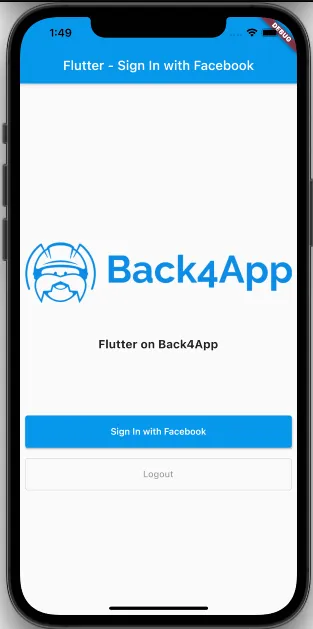
Run the project, and the app will load as shown in the image.
Conclusion
At this stage, you are able to use Sign in with Facebook in Flutter on Back4app.